My Book Got a Server Room
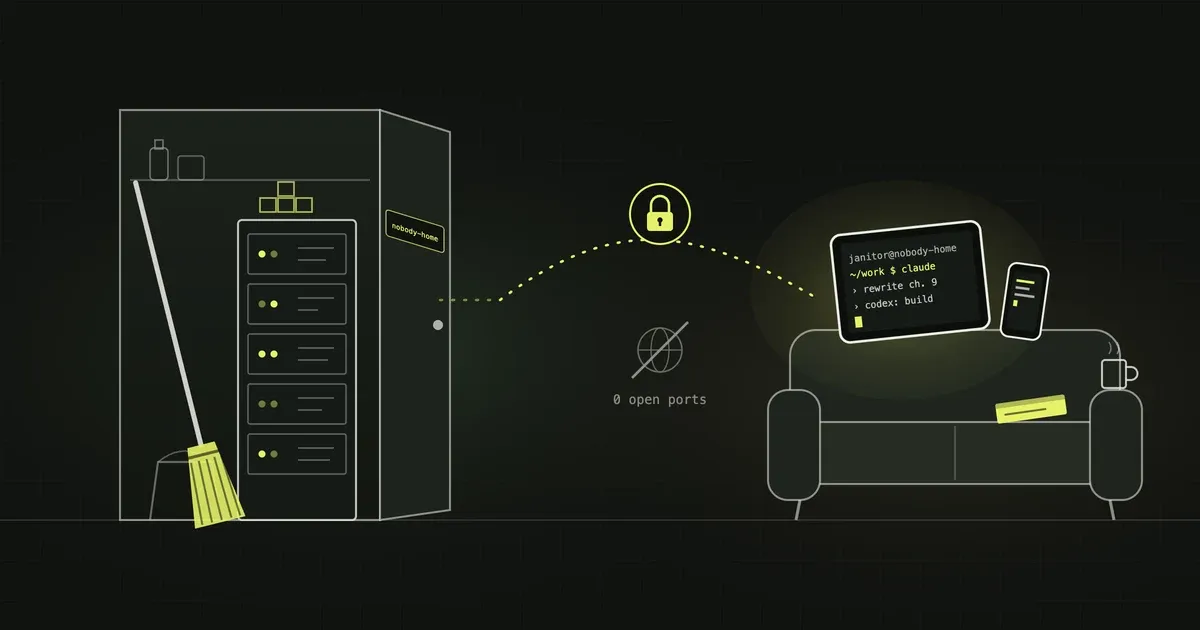
My book has a stack. I say it the way some people say their dog has an Instagram account.
The New Coder lives in a GitHub repo. Every chapter is a Markdown file. A Node script turns them into a static reading room, Cloudflare Pages serves it, a Pages Function runs a chat that answers only from the manuscript, and another pipeline builds the Kindle and KDP files. It is a book with a CI/CD history. It has commits titled “Reduce chat token growth in stored conversations.” Hemingway never had one of those.
For a while, that stack had one awkward dependency, and it was me. More precisely, it was my MacBook.
Codex and Claude Code lived on the laptop. They are the two agents from chapter 7, the ones I call “delegation” and “immersion”. When the laptop closed, the book stopped being written. When I was on the sofa with the iPad, thinking of a better opening for chapter 9, the book had no idea. It sat in a GitHub repo and on Cloudflare’s edge, waiting for me to get up, walk to the desk and open the lid. Every time. Like a ritual.
That was the bug. The fix took one Saturday morning: thirteen commits in about eighty minutes. I know the number because git keeps timestamps, and I look at them.
This is the story and the recipe at the same time. Every file is here, complete. If you copy them in order, you get the same box. If you only read the jokes, that’s fine too. I won’t check.
The rule I wrote and then had to obey
Chapter 7 of my own book says, quite sure of itself: durable infrastructure should come after proof, not before. Don’t set up a server for a project that hasn’t earned it.
I hate it when I’m right in print.
But the project had earned it. The book exists, it’s on Amazon, its chat answers questions, and its author keeps trying to edit it from devices with no terminal. That is proof. Or at least the kind I accept after a coffee.
So, the requirements, written the way I write them at work:
- Claude Code and Codex run on a server, always on.
- Nobody on the internet can reach them. No login page, no port, nothing.
- I can reach them from three devices: MacBook Air, iPad, iPhone.
- From any of them I land in the same session, exactly where I left it.
- If something breaks in there, it breaks inside a box, not on the host.
In meeting language: “Yes, but we’d need to review the dependencies.”
We reviewed them. All thirteen commits’ worth.
Step 0: What you need before you start
- A Linux server with Docker. Mine is an ARM Hetzner Cloud server (
aarch64) that already runs other things behind Traefik. You need Docker Engine and the Compose plugin. Nothing else on the host. The host does not need Tailscale: the container joins the tailnet by itself. - A Tailscale account, with the Tailscale app installed and logged in on every device that should get in. For me that’s the Mac, the iPad and the iPhone.
- A Claude subscription (Pro or Max) for Claude Code, and a ChatGPT account for Codex.
- A GitHub account, if your agents are going to work on a repo. Mine work on a book, which is a repo with feelings.
If your server is x86, two downloads in the Dockerfile change: ttyd and the Codex package. I mark them below.
Step 1: Prepare the tailnet
Before you build anything, the tailnet needs a few settings. You’ll find all of them in the Tailscale admin console.
MagicDNS and HTTPS certificates. In DNS, turn on MagicDNS, then turn on HTTPS Certificates. MagicDNS lets you type nobody-home instead of an IP. HTTPS lets Tailscale get a real certificate for the web terminal later. Your tailnet has a name like tail1234ab.ts.net; you’ll see it on that page.
A tag for the server. In Access controls, the policy file has to say who may use the tag. Add this block now. We lock down the rest of the policy in Step 5:
"tagOwners": {
  "tag:broom-cupboard": ["autogroup:admin"]
},
The tag is more important than it looks. A tagged node belongs to the tailnet, not to you. It can’t open connections to your personal devices, and its key stops depending on your login. The server becomes an employee, not a family member.
Step 2: Three files and a folder
A word about names first. In this article the container is called broom-cupboard and its node on the tailnet is nobody-home. Those are not their real names. The real ones are boring, and they are mine. Tailscale gets a public certificate for the node’s name. That name ends up in certificate transparency logs, and anyone can search those. So I’m not handing you a search term. Pick your own names. Make them dull or make them funny. Just don’t call them my-ai-agents-with-github-access.
The title says server room. It’s a broom cupboard. It always is.
On the server:
mkdir -p ~/stacks/broom-cupboard
cd ~/stacks/broom-cupboard
The Dockerfile
Debian slim, Tailscale and the GitHub CLI from their official apt repos, ttyd for the web terminal, Codex, an unprivileged user called janitor (who else works in a broom cupboard?), and Claude Code with its native installer. Every binary from a GitHub release is pinned to a version and checked against its SHA-256. I don’t trust downloads. I barely trust my own clipboard, as you’ll see.
FROM debian:bookworm-slim

ENV LANG=C.UTF-8 \
    TZ=Europe/Madrid

# Base tooling + Tailscale and GitHub CLI from their official apt repos.
RUN apt-get update \
 && apt-get install -y --no-install-recommends \
      ca-certificates curl gnupg tini tmux git openssh-client ripgrep less procps jq nano bash-completion tzdata \
 && curl -fsSL https://pkgs.tailscale.com/stable/debian/bookworm.noarmor.gpg \
      -o /usr/share/keyrings/tailscale-archive-keyring.gpg \
 && curl -fsSL https://pkgs.tailscale.com/stable/debian/bookworm.tailscale-keyring.list \
      -o /etc/apt/sources.list.d/tailscale.list \
 && curl -fsSL https://cli.github.com/packages/githubcli-archive-keyring.gpg \
      -o /usr/share/keyrings/githubcli-archive-keyring.gpg \
 && echo "deb [arch=$(dpkg --print-architecture) signed-by=/usr/share/keyrings/githubcli-archive-keyring.gpg] https://cli.github.com/packages stable main" \
      > /etc/apt/sources.list.d/github-cli.list \
 && apt-get update \
 && apt-get install -y --no-install-recommends tailscale gh \
 && rm -rf /var/lib/apt/lists/*

# ttyd web terminal (not packaged in bookworm): pinned static build, checksum
# from the release's SHA256SUMS. The server is aarch64.
ARG TTYD_VERSION=1.7.7
ARG TTYD_SHA256=b38acadd89d1d396a0f5649aa52c539edbad07f4bc7348b27b4f4b7219dd4165
RUN curl -fsSL "https://github.com/tsl0922/ttyd/releases/download/${TTYD_VERSION}/ttyd.aarch64" \
      -o /usr/local/bin/ttyd \
 && echo "${TTYD_SHA256}  /usr/local/bin/ttyd" | sha256sum -c - \
 && chmod 0755 /usr/local/bin/ttyd

# OpenAI Codex CLI: pinned full package (codex-package.json + bin/ + resources),
# checksum matches the release asset digest on GitHub. The bare binary is not
# enough: the interactive TUI refuses to start without the package layout.
# Lives outside /home/janitor so rebuilds update it (the janitor_home volume only
# seeds on first start). Bump both ARGs to upgrade.
ARG CODEX_VERSION=0.160.0
ARG CODEX_SHA256=7f0fe42ff22ecfa3a47bc4a34f5b22c4218b431a4ec0aba51c7d98299f07900c
RUN curl -fsSL "https://github.com/openai/codex/releases/download/rust-v${CODEX_VERSION}/codex-package-aarch64-unknown-linux-musl.tar.gz" \
      -o /tmp/codex.tar.gz \
 && echo "${CODEX_SHA256}  /tmp/codex.tar.gz" | sha256sum -c - \
 && mkdir -p /opt/codex \
 && tar -xzf /tmp/codex.tar.gz -C /opt/codex \
 && ln -s /opt/codex/bin/codex /usr/local/bin/codex \
 && rm -f /tmp/codex.tar.gz

# Unprivileged user that Tailscale SSH logs in as.
RUN useradd -m -u 1000 -s /bin/bash janitor \
 && echo 'export PATH="$HOME/.local/bin:$PATH"' > /etc/profile.d/claude-path.sh \
 && printf '%s\n' \
      '# Long-lived subscription token from `claude setup-token`, if present.' \
      'if [ -r "$HOME/.claude-oauth-token" ]; then' \
      '  export CLAUDE_CODE_OAUTH_TOKEN="$(tr -d "[:space:]" < "$HOME/.claude-oauth-token")"' \
      'fi' > /etc/profile.d/claude-token.sh

# Claude Code (native installer). Lands in /home/janitor/.local, which seeds the
# janitor_home volume on first start; afterwards Claude Code auto-updates itself.
USER janitor
RUN curl -fsSL https://claude.ai/install.sh | bash \
 && mkdir -p /home/janitor/work
USER root

COPY entrypoint.sh /usr/local/bin/entrypoint.sh
RUN chmod 0755 /usr/local/bin/entrypoint.sh

ENTRYPOINT ["/usr/bin/tini", "--", "/usr/local/bin/entrypoint.sh"]
On x86, use ttyd.x86_64 and codex-package-x86_64-unknown-linux-musl.tar.gz, and take both checksums from their release pages. Don’t copy my checksums for a different file. That’s not pinning, that’s hoping.
Two details matter later. Codex lives in /opt/codex, outside the user’s home, so rebuilding the image is what upgrades it. Claude Code lives in the home, so it updates itself, and the update survives rebuilds because the home is a volume.
The entrypoint
This is where Tailscale starts. It runs tailscaled in userspace networking mode. Normally Tailscale wants a TUN device and the NET_ADMIN capability. That’s a polite way to ask for almost-root on the host network. In userspace mode it needs neither. In theory it’s slower. For a terminal, you will never notice.
Then it joins the tailnet with Tailscale SSH on. So there’s no SSH server to run and no keys to manage. I never have to edit authorized_keys again. Finally it starts ttyd as the janitor user, only on 127.0.0.1, inside a loop. If ttyd dies, it comes back, and the container doesn’t go down with it.
#!/bin/sh
# Starts tailscaled in userspace mode (no TUN, no NET_ADMIN) and joins the
# tailnet with Tailscale SSH enabled. On first boot `tailscale up` prints a
# login URL to the container logs and waits; afterwards the state volume keeps
# the node logged in.
#
# Also runs ttyd (web terminal) as the `janitor` user on 127.0.0.1:7681. It is
# only reachable through `tailscale serve` (tailnet-only HTTPS). Auth is the
# Tailscale identity: Serve adds Tailscale-User-Login to every proxied request
# (and strips any copy sent by the client), and ttyd refuses requests without it.
# Which devices can reach this node at all is decided by the tailnet ACLs.
set -eu

SOCK=/var/run/tailscale/tailscaled.sock
mkdir -p /var/run/tailscale /var/lib/tailscale

tailscaled \
  --tun=userspace-networking \
  --state=/var/lib/tailscale/tailscaled.state \
  --socket="$SOCK" &
TSD_PID=$!

i=0
until [ -S "$SOCK" ]; do
  i=$((i + 1))
  [ "$i" -gt 30 ] && { echo "tailscaled did not start" >&2; exit 1; }
  sleep 1
done

tailscale --socket="$SOCK" up \
  --ssh \
  --hostname="${TS_HOSTNAME:-nobody-home}"

echo "Tailscale up: $(tailscale --socket="$SOCK" ip -4 2>/dev/null | head -1)"

# Restart ttyd if it ever exits; it must not take the container down.
# No --credential: Safari and every iOS browser omit basic auth on the
# WebSocket upgrade, so ttyd denied them. No --check-origin either: behind
# tailscale serve it denied real browser WebSockets.
(
  while true; do
    setpriv --reuid=janitor --regid=janitor --init-groups \
      env HOME=/home/janitor USER=janitor SHELL=/bin/bash \
      ttyd --interface 127.0.0.1 --port 7681 --writable \
        --auth-header Tailscale-User-Login \
        --client-option titleFixed=nobody-home \
        bash -lc 'tmux new -A -s main -c ~/work' || true
    sleep 2
  done
) &

wait "$TSD_PID"
The comments about Safari are battle scars. You’ll get that story in Step 6.
The compose file
This is the part I’m proudest of. It’s mostly a list of things the container is not allowed to do.
services:
  agents:
    build: .
    image: broom-cupboard:latest
    container_name: broom-cupboard
    hostname: nobody-home
    restart: unless-stopped
    mem_limit: 1536m
    cpus: 1.50
    pids_limit: 512
    # tailscaled runs as root in userspace mode; Tailscale SSH needs to drop to
    # the `janitor` user, hence SETUID/SETGID. No NET_ADMIN, no /dev/net/tun.
    cap_drop:
      - ALL
    cap_add:
      - SETUID
      - SETGID
      - CHOWN
      - DAC_OVERRIDE
      - FOWNER
      - KILL
      - AUDIT_WRITE
    security_opt:
      - no-new-privileges:true
    environment:
      TS_HOSTNAME: nobody-home
      TZ: Europe/Madrid
    volumes:
      # Tailscale node identity. Deleting it means re-login and a new node.
      - tailscale_state:/var/lib/tailscale
      # Whole home: Claude Code binary, ~/.claude (login), ~/.claude.json, ~/work.
      - janitor_home:/home/janitor
    # No published ports and not on the reverse-proxy network: reachable only via the tailnet.
    networks:
      - broom_cupboard
    logging:
      driver: json-file
      options:
        max-size: "10m"
        max-file: "3"
    healthcheck:
      test: ["CMD-SHELL", "tailscale --socket=/var/run/tailscale/tailscaled.sock status >/dev/null 2>&1 || exit 1"]
      interval: 60s
      timeout: 5s
      retries: 3
      start_period: 120s

volumes:
  tailscale_state:
  janitor_home:

networks:
  broom_cupboard:
Read it like an employment contract:
- No
ports:section. Nothing on the host listens for this container. A port scan of the server finds the same things it found yesterday. - Its own network. Traefik, which sees everything else on the box, doesn’t know this container exists.
- Every capability dropped. Then it gets back only the few that Tailscale SSH needs to switch to the
janitoruser.no-new-privilegesstops anything inside from climbing higher. - 1.5 GB of RAM, 1.5 CPUs, 512 processes. If an agent gets excited and starts a huge build, it only uses up its own share. The other services on the box don’t notice.
- Two volumes.
tailscale_stateis the node’s identity. Delete it and the server forgets it ever joined your tailnet.janitor_homeis the whole home: logins, settings, Claude Code itself and~/work, where the repos live. Rebuild the image as often as you like. These stay.
It is the introvert of the server. It only talks to you if you’re already in the group chat.
Step 3: Build it and let it join
docker compose build
docker compose up -d
docker logs -f broom-cupboard
On the first start, tailscale up prints a login URL and waits. Open it in a browser, log in to your Tailscale account, and the node appears in the admin console as nobody-home. After that, the identity lives in the tailscale_state volume, and restarts and rebuilds don’t ask again.
Check from the Mac:
tailscale status | grep nobody-homeStep 4: Give it a tag and stop its key from expiring
In the admin console, under Machines, open the ⋯ menu on nobody-home:
- Edit ACL tags → add
tag:broom-cupboard. This is the moment the server stops being “one of my devices” and becomes “a server of the tailnet”. - Disable key expiry. By default, node keys expire after a few months and the node quietly drops off. I expected the tag to take care of this. It didn’t. Check that the machine no longer shows an expiry date.
Then restart the container once, to make sure the node comes back with its tag:
docker compose restartStep 5: Lock the door, and test the lock
There’s no password anywhere, so something else has to control who gets in. That somewhere is the tailnet policy, in Access controls. Here is a policy that does the same as mine. Put in your own device IPs (from tailscale status or the Machines page) and your own login:
{
  "tagOwners": {
    "tag:broom-cupboard": ["autogroup:admin"]
  },

  // Policies don't accept MagicDNS names, so the allowed devices go by IP.
  "hosts": {
    "macbook-air": "100.64.0.11",
    "ipad":        "100.64.0.12",
    "iphone":      "100.64.0.13",
    "mac-mini":    "100.64.0.14"
  },

  "acls": [
    // Personal devices keep reaching each other as before.
    {"action": "accept", "src": ["autogroup:member"], "dst": ["autogroup:member:*"]},

    // Only three devices reach the agent box, and only for SSH and the web terminal.
    {"action": "accept", "src": ["macbook-air", "ipad", "iphone"], "dst": ["tag:broom-cupboard:22,443"]}
  ],

  "ssh": [
    // Your own devices, as before.
    {"action": "check", "src": ["autogroup:member"], "dst": ["autogroup:self"], "users": ["autogroup:nonroot", "root"]},

    // The agent box: only the unprivileged `janitor` user, with a periodic re-check.
    {"action": "check", "src": ["autogroup:member"], "dst": ["tag:broom-cupboard"], "users": ["janitor"]}
  ],

  // If an edit ever breaks these, the console refuses to save it.
  "tests": [
    {"src": "macbook-air", "accept": ["tag:broom-cupboard:22", "tag:broom-cupboard:443"]},
    {"src": "iphone",      "accept": ["tag:broom-cupboard:22", "tag:broom-cupboard:443"]},
    {"src": "mac-mini",    "deny":   ["tag:broom-cupboard:22", "tag:broom-cupboard:443"]}
  ],
  "sshTests": [
    {"src": "you@example.com", "dst": ["tag:broom-cupboard"], "check": ["janitor"], "deny": ["root"]}
  ]
}
My real policy has a few more devices on the deny side. If your tailnet already has a policy, merge these blocks into it. Don’t paste over the whole thing.
What this gets you:
- Three devices reach the box, on two ports. Everything else in my tailnet, including the Mac mini on my desk, can’t even see it. Nothing personal against the Mac mini. It just doesn’t need to be in the room.
- SSH only as
janitor. Ask forrootand Tailscale answers, as politely as a government office, “tailnet policy does not permit you to SSH as user root.” - Because the box is tagged, it can’t open connections to my laptop or phone. If someone ever gets inside the container, they find a dead end. Not a way into my home network.
- The
testsandsshTestsblocks are my favourite part. If anyone (that is, me, at midnight) edits the rules so that another device gets in, or root SSH works again, the console refuses to save. A policy that tests itself. I want one for my diet.
One trap: don’t tag your client devices. Tailscale Serve only sends the identity header (Step 6) for devices owned by a user. Tag your iPad and the web terminal will refuse it. And if you ever reinstall Tailscale on a device, it gets a new IP, so update hosts.
Somewhere around here I caught myself drawing a threat model for whether I should be allowed to edit chapter 4 from bed. Columns for likelihood, impact, mitigations. Then it occurred to me that the bed was already covered: the iPad is on the allowed list, and the iPad goes wherever I go. I deleted the table.
Step 6: A web terminal for the iPhone
SSH is lovely on a laptop. On an iPhone, it’s a punishment. So the container also runs ttyd, a terminal in a web page. It listens only on 127.0.0.1 inside the container. Run this once to publish it on the tailnet, and only on the tailnet:
docker exec broom-cupboard tailscale --socket=/var/run/tailscale/tailscaled.sock \
  serve --bg --https=443 http://127.0.0.1:7681
Tailscale Serve now answers on https://nobody-home.<your-tailnet>.ts.net/ with a real certificate and forwards to ttyd. The setting lives in the state volume, so rebuilds keep it. Never use funnel here instead of serve. Funnel puts things on the public internet, and the whole point here is that nothing is on the public internet.
Now, the Safari story. The first version of ttyd had a password. Chrome on the Mac loved it. Safari showed a terminal for half a second and then fell into a loop of “Press Enter to reconnect”, forever, with the calm of a monk who never gets bored.
It turns out Safari doesn’t send basic auth on the WebSocket upgrade. Neither does any other browser on iOS, because they all use WebKit underneath. ttyd refused the connection, the page retried, ttyd refused again. A very stable system. Just not a useful one. --check-origin caused the same symptom behind Serve, so it went too.
So I removed the password and let Tailscale be the login. Serve adds a Tailscale-User-Login header with the real identity of the device that connects. ttyd, started with --auth-header Tailscale-User-Login, refuses any request without it (HTTP 407). Of course, I tried to cheat. I sent a request with a forged header claiming to be forged@evil.example. Serve threw it away and put in my real identity. I have rarely been so happy to be caught.
The ts.net name doesn’t resolve on public DNS. The only thing the internet can learn is the hostname, from certificate transparency logs, because Tailscale gets a real certificate for it. Knowing the address of a house doesn’t open the door.
Check it from the Mac. A 200 means it works:
curl -s -o /dev/null -w '%{http_code}\n' https://nobody-home.<your-tailnet>.ts.net/Step 7: Log Claude Code in (without /login)
Getting Claude Code authenticated was its own comedy act.
/login over SSH prints a long URL. I copied it, pasted it into the browser, and claude.ai replied “Missing state parameter”. The terminal had cut the URL in half when I copied it. Terminals do that. I think they enjoy it.
The fix is a long-lived subscription token. On the Mac:
claude setup-tokenIt prints a line that starts with sk-ant-oat01-. Copy it. Then send it to the server straight from the clipboard. I added a check first, because I didn’t want to find out later that I’d sent half a shopping list to a server:
pbpaste | tr -d '[:space:]' | grep -qE '^sk-ant-oat01-' \
  && pbpaste | tr -d '[:space:]' | ssh janitor@nobody-home 'umask 077; cat > ~/.claude-oauth-token' \
  && echo "OK, token sent" \
  || echo "The clipboard doesn't hold a token, nothing sent"
The file lands with mode 600. The profile script baked into the image exports it as CLAUDE_CODE_OAUTH_TOKEN in every login shell. Open a new tmux session, run claude, and you’re in.
The token lasts about a year. I have a calendar reminder. That is my idea of personal growth.
Step 8: GitHub, with a code instead of a URL
Inside the container, as janitor:
gh auth login --hostname github.com --git-protocol https --web
gh auth setup-git
--web gives you a short code and https://github.com/login/device. You type the code on any device, so nothing long has to survive a copy and paste over SSH. I had learned that lesson forty minutes earlier. gh auth setup-git makes plain git clone and git push over HTTPS use the same login.
Then the moment of truth:
cd ~/work
gh repo clone <you>/agenticai-book
The book’s repo cloned as if it had always lived there.
One honest note. There’s no keyring in the container, so the token sits in plain text in ~/.config/gh/hosts.yml, inside the volume. Whoever gets into the container gets that token too. I chose a normal login with access to all my repos, on purpose. A fine-grained token limited to a few repos is the tighter option: gh auth login --with-token < file.
Step 9: Then came Codex
With Claude settled in, the other half of chapter 7 had to move in too.
Codex was harder. My first build used the bare codex binary from the release. codex exec worked fine. The interactive codex refused to start, saying the CLI “has no complete local package”. It wanted the full package, with its folders and resources, not just the executable. That’s why the Dockerfile above downloads codex-package-…tar.gz and unpacks it into /opt/codex. Learn from my rebuild.
Logging in uses a device code too:
codex login --device-authIt fails until you turn on device-code sign-in for Codex in ChatGPT → Settings → Security. Turn it on, run the command again, type the code, done. Check with codex login status.
Then ~/.codex/config.toml. It lives in the volume, not in the image, so you write it once:
# Codex bwrap sandbox cannot run here (seccomp blocks user namespaces);
# the broom-cupboard container is the sandbox.
sandbox_mode = "danger-full-access"
approval_policy = "never"

# Skip the per-folder "Trust this folder?" prompt for everything under ~/work.
[projects."/home/janitor/work"]
trust_level = "trusted"

# Do not expose the ChatGPT account apps (connectors) inside this container;
# use gh/git here instead.
[features]
apps = false
Each line has a story.
danger-full-access. Codex normally runs commands inside its own sandbox, built on bubblewrap. Bubblewrap needs user namespaces. Docker’s default seccomp profile blocks them (unshare -U → “Operation not permitted”), and my host also restricts them in AppArmor. I could have relaxed seccomp for the whole container, just so Codex could have its little sandbox inside my bigger one. I didn’t. A sandbox inside a sandbox inside a server. At some point you have to stop. The container is the sandbox, for Codex and for Claude alike. That’s why Step 2 was so strict.
apps = false. By default, Codex brings along the apps you’ve connected in ChatGPT. One of mine was a GitHub connection with write access, and I wanted this box to use only the gh login from Step 8. One line turned it off. Inheritance is nice in families. In permissions, less so.
Step 10: Using it
All three ways in land in the same tmux session, called main.
From the Mac, over Tailscale SSH:
ssh -t janitor@nobody-home 'tmux new -A -s main -c ~/work'Run claude or codex inside. Detach with Ctrl-b d. Run the same command again and you’re back. Because the policy uses check mode, Tailscale sometimes asks you to confirm in the browser. That’s the lock doing its job.
From the iPad or iPhone: open https://nobody-home.<your-tailnet>.ts.net/ in Safari. No password. Your device is the password.
From a borrowed computer: the Tailscale admin console has an SSH button on each machine. It opens a terminal in the browser, logged in as you, under the same policy. Use janitor as the user. On a tablet the typing is awkward, but it works.
I can start a sentence on the laptop, close the lid, pick up the iPhone and find the cursor blinking exactly where I left it. It’s the closest thing I have to teleportation, and it runs on Debian.
Upgrading later: Claude Code updates itself. For Codex, change CODEX_VERSION and CODEX_SHA256 in the Dockerfile, then:
docker compose build && docker compose up -dLogins, repos and the Tailscale identity all live in volumes, so nothing else changes.
The side quest nobody asked for
While I was on the box, I noticed an old Docker Swarm doing nothing. Single node, no services, two orphaned secrets from an earlier experiment. I like things tidy, so I ran docker swarm leave.
Docker’s internal DNS immediately started returning SERVFAIL for every container name. Outside names still resolved, so nothing public went down, but containers stopped finding each other. Restarting a container didn’t help. Only systemctl restart docker fixed it, with about forty seconds of downtime and a slightly faster heartbeat.
The lesson went into the audit file in bold: after leaving a swarm, restart the Docker daemon in the same maintenance window, then check that containers resolve each other by name. I learned it so you don’t have to. You’re welcome.
The stack, updated
Here is what the book runs on now:
| Layer | Before | After |
|---|---|---|
| Source | GitHub repo | Same |
| Website and chat | Cloudflare Pages + Pages Functions | Same |
| Book chat brain | OpenAI with a vector store | Same |
| Agents | Codex and Claude Code on a MacBook | Codex and Claude Code in one tmux session on Hetzner |
| Way in | Sit at the desk | Mac, iPad or iPhone, over Tailscale only |
| Author’s excuses | Plenty | Fewer |
The split from chapter 7 still holds. Codex is where I delegate: build the site, run the tests, sync the vector store. Claude Code is where I sit close: rework a paragraph, chase a broken link through the viewer, argue about a chapter title. The difference now is that both of them are always on, next to each other, in a box the rest of the internet can’t see.
Thirteen commits. Eighty minutes. One broken DNS, one forged header, zero open ports.
The book now has a server room. Fine, a broom cupboard. The author still has a sofa, and for the first time the two of them work together.
P.S. If you want to read the chapters I keep quoting, The New Coder is on Amazon. The link goes through a small Cloudflare Pages Function in the book’s own stack. It looks at which country you’re in and sends you to your local Amazon store. Yes, even the “buy” button has infrastructure. Chapter 7 explains why I can’t help myself. Chapter 9 explains why I should.