ChatGPT and Crunchbase API: How to Create a Plugin from Scratch
ChatGPT and Crunchbase API: How to Create a Plugin from Scratch

Discover how to create plugins for ChatGPT in this comprehensive step-by-step tutorial. Learn how to extend ChatGPT’s capabilities using the Crunchbase Basic APIs as a data service.

As a developer, I’m always looking for ways to expand and improve the capabilities of the tools I use. Recently, I’ve been working with OpenAI’s ChatGPT and discovered a fascinating feature: plugins.

A ChatGPT plugin is essentially an extension that allows ChatGPT to interact with APIs, databases, and other services. This means I can customize and enhance ChatGPT’s responses, allowing it to provide richer and more accurate information.

We’ll start from the beginning but if you want to go straight to the result, here’s the repo on GitHub and the virtual machine on CodeSandbox.

What are ChatGPT Plugins and what can they do?

Plugins are tools designed specifically for language models with security as a core principle, helping ChatGPT access up-to-date information, run computations, or use third-party services.

Tutorial Objective

The main objective of this tutorial is to guide you through the process of creating a ChatGPT plugin that can search for company information using a third-party service, in this case, the company and funding rounds database Crunchbase.

To achieve this goal, we’ll use several tools:

  • First, we’ll use GPT4 in ChatGPT for code generation.
  • Additionally, we’ll use CodeSandbox to deploy our plugin.
  • Finally, we’ll use the Crunchbase Basic API to search for company information.

Initial Setup

Before we start, we need to configure the tools:

  • ChatGPT and GPT4: to test the plugins, you’ll need to sign up as a developer. Follow these instructions to join the waitlist. You can proceed with the tutorial while OpenAI reviews your request.
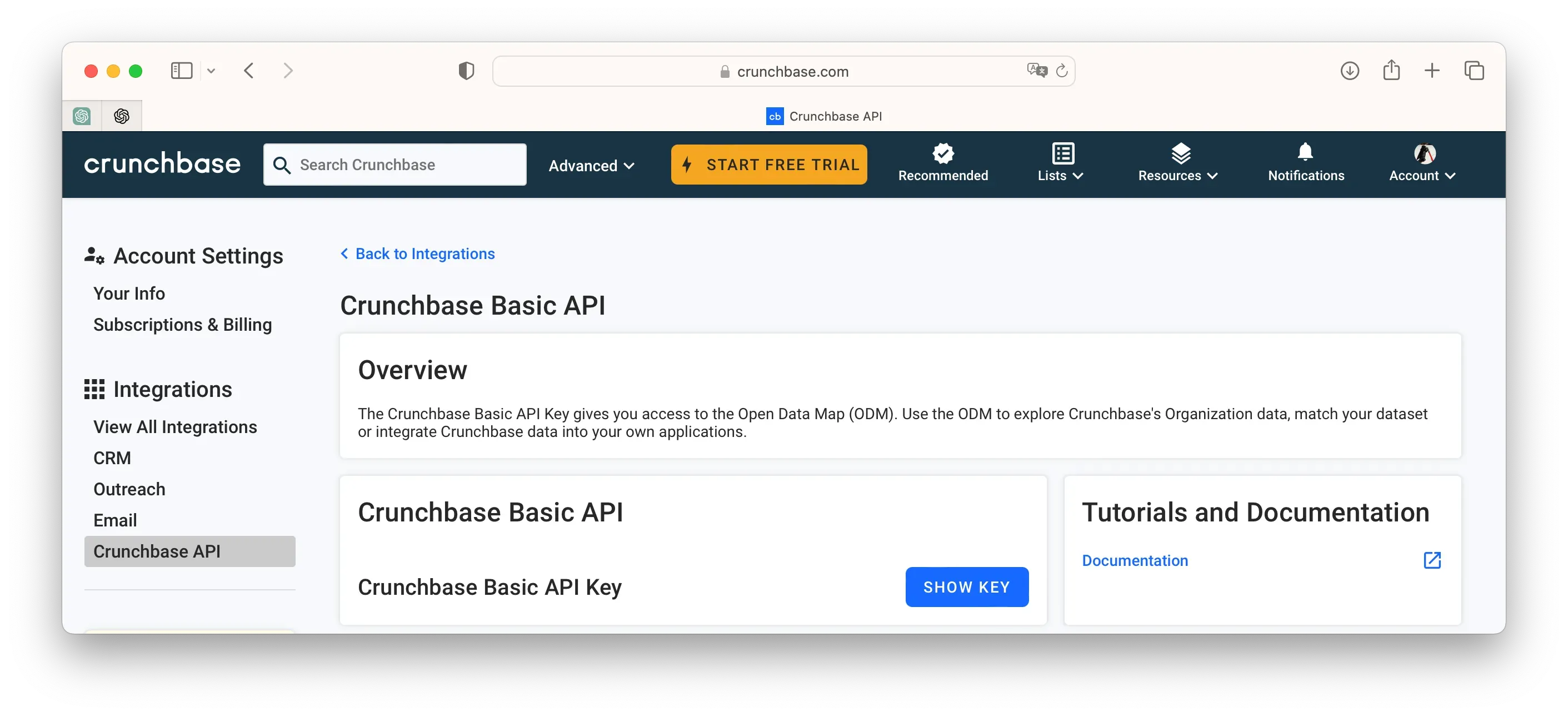
  • Crunchbase Basic API: you’ll need a CRUNCHBASE_API_KEY so first you have to register as a user (it’s free). Once registered follow these instructions.

Go to your personal area (Account Settings), you’ll see the “Integrations” section and there, Crunchbase API. You can now generate the API_KEY to access the data.

Crunchbase API Crunchbase API_KEY generation screen

First Step: Create your API

In general, plugins have three main elements: your API, its specification so OpenAI can understand it, and the manifest that will describe it so ChatGPT can use it. Remember that a plugin is just a tool that ChatGPT can use, so you’ll need to correctly describe its functionality.

How would you describe the basic function of the plugin (and therefore your API)? In this case, it would be something like this:

Company search and lookup application that lets the user to search for companies and retrieve information from them using the Crunchbase API. The search for companies will be based on their name.

With this description, we’re going to ask ChatGPT to generate the basic skeleton of our API to later improve it. We’ll use this template where we’ve incorporated the general description of our API:

Write a company search and lookup application using FastAPI that lets the user to search for companies and retrieve information from them using the Crunchbase API. The search for companies will be based on their name. Include a '__main__' section which will run this app using uvicorn. The python module where I save this code will be called 'main.py'. In addition to the normal endpoints, include a route '/.well-known/ai-plugin.json which serces (as JSON) the contents of './manifest.json', located in the same directory as 'main.py'. Exclude this endpoint from the OpenAPI spec and don't serve any other static content. The specification of Crunchbase's API is in this swagger https://app.swaggerhub.com/apis-docs/Crunchbase/crunchbase-enterprise_api/1.0.3 You will use the endpoint Search Organizations (POST) to search for companies based on their name and you will fetch the following fields: 'name', 'short-description' and 'website'. The endpoints you will use from this API will be: - Search Organizations (POST): https://app.swaggerhub.com/apis-docs/Crunchbase/crunchbase-enterprise_api/1.0.3#/Search/post_searches_organizations The information with the Organizations' schema is here: https://app.swaggerhub.com/apis-docs/Crunchbase/crunchbase-enterprise_api/1.0.3#/Organization

Let’s see what we’ve asked for:

  • First, we’ve described the object of the task and the basic requirements for using FastAPI and Crunchbase.
  • We’ve indicated that the code will be in a “main.py” file and will be served with “uvicorn”.
  • Following OpenAI’s specifications, we ask that the manifest.json file be served at the URL indicated by OpenAI, i.e., /.well-known/ai-plugin.json.

Here’s the code we’ll use in CodeSandbox:

from fastapi import FastAPI, HTTPException
from fastapi.responses import JSONResponse
from fastapi.openapi.utils import get_openapi
from pydantic import BaseModel
import requests
import json
import os

app = FastAPI()

class Company(BaseModel):
    name: str

@app.post("/search")
async def search_company(company: Company):
    user_key = os.getenv('CRUNCHBASE_API_KEY')
    url = f"https://api.crunchbase.com/api/v4/searches/organizations?user_key={user_key}"
    
    data = {
        "field_ids": ["name", "short_description", "website_url", "image_url"],
        "query": [
            {
                "type": "predicate",
                "field_id": "identifier",
                "operator_id": "contains",
                "values": [company.name]
            }
        ],
        "limit": 5
    }
    
    response = requests.post(url, data=json.dumps(data))
    if response.status_code == 200:
        response_data = response.json()
        extracted_data = []
        for entity in response_data['entities']:
            extracted_entity = {
                'company_name': entity['properties'].get('name', None),
                'description': entity['properties'].get('short_description', None),
                'website_url': entity['properties'].get('website_url', None),
                'image_url': entity['properties'].get('image_url', None),
            }
            extracted_data.append(extracted_entity)
        return extracted_data
    else:
        raise HTTPException(status_code=400, detail="Unable to fetch data from Crunchbase API")

@app.get("/.well-known/ai-plugin.json", include_in_schema=False)
async def read_manifest():
    try:
        with open('./manifest.json', 'r') as file:
            data = json.load(file)
            return JSONResponse(content=data)
    except FileNotFoundError:
        raise HTTPException(status_code=404, detail="manifest.json not found")

@app.get("/openai.json")
async def get_openapi_json():
    return JSONResponse(get_openapi(
        title="API for Crunchbase ChatGPT Plugin",
        version="0.9.0",
        description="Sample API exposing an enterprise search endpoint using Crunchbase's Basic API",
        routes=app.routes,
    ))

if __name__ == "__main__":
    import uvicorn
    uvicorn.run(app, host="0.0.0.0", port=8000)

Deploying the API on CodeSandbox

Once registered on the platform, you just need to create a new machine based on Python. Once it has finished deploying, you’ll have access to the files. First, you need to include the required libraries in requirements.txt: fastapi, uvicorn, and requests.

CodeSandbox Deploy

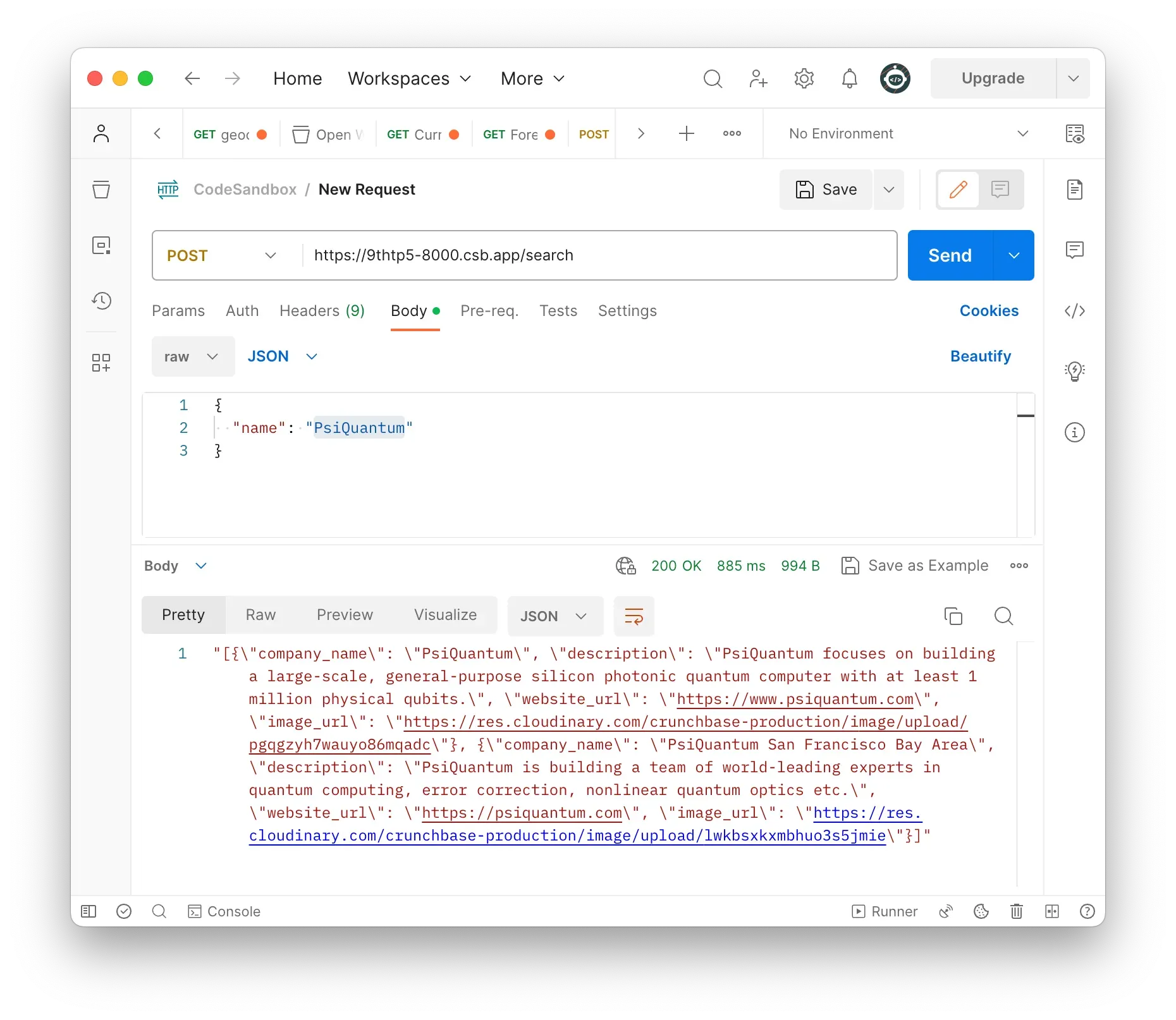
The machine should already be serving requests so you could use Postman, for example, to test it.

Postman Test

The manifest.json file

Now we just need to use the manifest.json template provided by OpenAI to include our adaptations.

{
  "schema_version": "v1",
  "name_for_human": "Crunchbase Plugin",
  "name_for_model": "crunchbase_plugin",
  "description_for_human": "Company information search provided by Crunchbase Basic API (name, description, website and image)",
  "description_for_model": "Plugin for company information search. You can search for companies by name and the information retrieved is their name, description, website and image.",
  "auth": {
    "type": "none"
  },
  "api": {
    "type": "openapi",
    "url": "/openai.json"
  },
  "logo_url": "https://data.crunchbase.com/docs/crunchbase-basic-getting-started",
  "contact_email": "",
  "legal_info_url": ""
}

Installing the plugin with ChatGPT

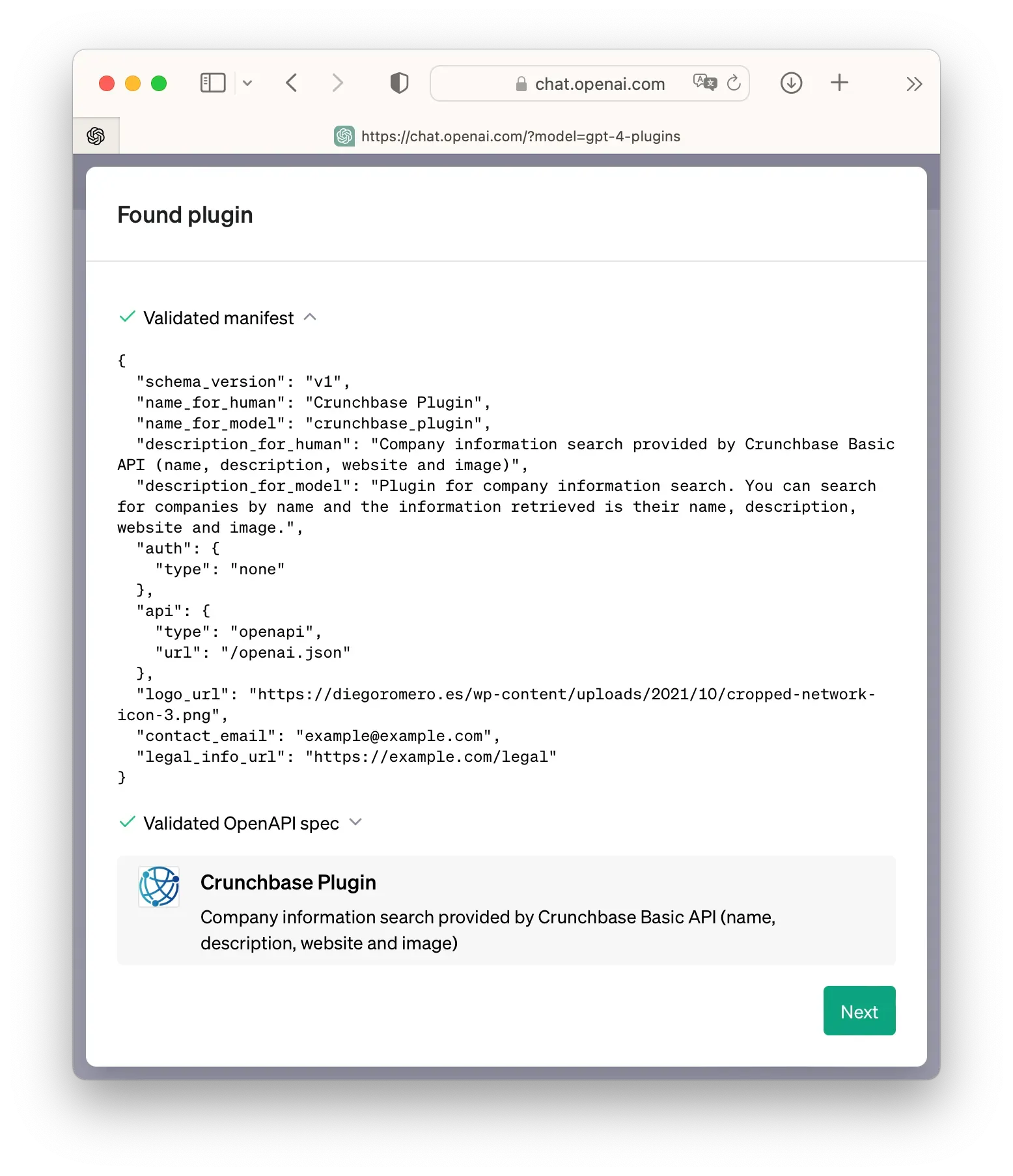
If everything went well, now you just need to provide the URL of the virtual machine where our API is running in the Plugin Store of the ChatGPT interface. Here’s the sequence.

Step 1 Step 2 Step 3 Step 4 Step 5 Step 6 Step 7 Step 8 Step 9

Next Steps

As you’ve seen, the process of creating a plugin is simple. The complexity lies in managing the information served by the data API and how it’s presented to the ChatGPT interface.

Final Considerations

This exploration exercise has been a demonstration of how we can expand AI capabilities. With GPT4’s help, I’ve been able to connect data effectively and simply.

powered by Crunchbase

Powered by Crunchbase

Crunchbase BASIC APIs has been central to this exercise. I’ve been using this database in my work for a long time.