How I Built a Lean Hetzner Hub for Docker, Traefik, and Nanobot
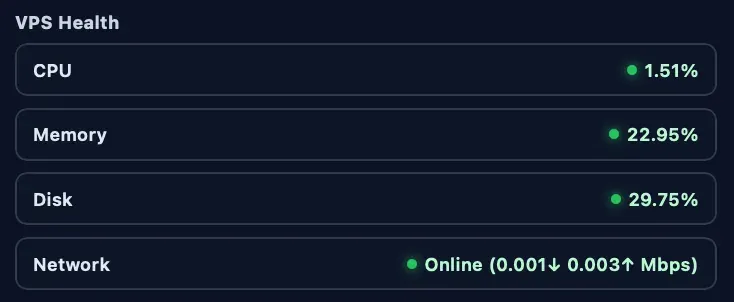
I wanted an infra setup I could explain in five minutes and operate half asleep.
No managed platform magic. No hidden control plane. Just:
- one Hetzner VPS
- Cloudflare DNS and proxy
- Traefik as the edge router
- Docker Compose stacks
- a public status site
- Nanobot behind HTTPS
- repeatable security checks
This is the exact playbook I now use.
What is running
- Host: Hetzner Cloud (
CAX11, Ubuntu24.04) - Edge: Cloudflare (proxied DNS)
- Reverse proxy: Traefik (
:80and:443only) - Public app:
<PUBLIC_APP_DOMAIN> - Nanobot app:
<NANOBOT_DOMAIN> - Search sidecar:
ddg-mcp - Security baseline: SSH hardening +
fail2ban+ weekly CVE checks
Architecture at a glance
flowchart TB
    U[User Browser] --> CF[Cloudflare Proxy]
    CF --> T

    subgraph H[Hetzner VPS]
      T[Traefik]
      B[Basic Public Stack]
      N[Nanobot Gateway]
      D[ddg-mcp]
      W[Weekly CVE Watch]
    end

    T --> B
    T --> N
    N --> D
    N --> OAI[OpenAI API]
    W --> N
    W --> D
1) Provision the server in Hetzner
Settings I used:
- Region:
Germany / NBG1 - Image:
Ubuntu 24.04 - Type:
CAX11 - Public IPv4: enabled
- Firewall inbound: TCP
22,80,443 - Firewall outbound: allow all
Add your SSH public key during creation.
2) First login and host hardening
Bootstrap with root once, then move to a sudo user.
ssh -i <SSH_KEY_PATH> root@<SERVER_IP>

apt-get update
apt-get install -y fail2ban ufw unattended-upgrades ca-certificates curl gnupg

ufw allow 22/tcp
ufw allow 80/tcp
ufw allow 443/tcp
ufw --force enable

sed -i 's/^#\?PasswordAuthentication .*/PasswordAuthentication no/' /etc/ssh/sshd_config
sed -i 's/^#\?KbdInteractiveAuthentication .*/KbdInteractiveAuthentication no/' /etc/ssh/sshd_config
systemctl restart ssh

systemctl enable --now fail2ban
Then:
- create
<SSH_USER>with sudo - disable root SSH login
- use only key-based login from now on
3) Persist fail2ban SSH protection
cat >/etc/fail2ban/jail.local <<'EOF2'
[DEFAULT]
bantime = 3600
findtime = 600
maxretry = 5
backend = systemd

[sshd]
enabled = true
port = 22
logpath = %(sshd_log)s
EOF2

systemctl restart fail2ban
fail2ban-client status sshd
4) Install Docker Engine + Compose plugin
install -m 0755 -d /etc/apt/keyrings
curl -fsSL https://download.docker.com/linux/ubuntu/gpg | gpg --dearmor -o /etc/apt/keyrings/docker.gpg
chmod a+r /etc/apt/keyrings/docker.gpg

. /etc/os-release
echo \
  "deb [arch=$(dpkg --print-architecture) signed-by=/etc/apt/keyrings/docker.gpg] https://download.docker.com/linux/ubuntu \
  ${VERSION_CODENAME} stable" | tee /etc/apt/sources.list.d/docker.list >/dev/null

apt-get update
apt-get install -y docker-ce docker-ce-cli containerd.io docker-buildx-plugin docker-compose-plugin
systemctl enable --now docker
5) Configure Cloudflare DNS and TLS
Point both app domains to the VPS IPv4 and keep proxy enabled:
<PUBLIC_APP_DOMAIN>-> VPS IPv4 (proxied)<NANOBOT_DOMAIN>-> VPS IPv4 (proxied)
Cloudflare SSL/TLS mode: Full (strict).
Traefik handles certificates with ACME DNS challenge via Cloudflare token.
sequenceDiagram
    participant Browser
    participant CF as Cloudflare
    participant T as Traefik
    participant App as Target Service

    Browser->>CF: HTTPS request (Host header)
    CF->>T: Proxied HTTPS
    T->>T: Match router by host/path labels
    T->>App: Forward to service
    App-->>T: Response
    T-->>CF: Response + security headers
    CF-->>Browser: Final response
6) Deploy the public baseline stack
From local repo to server:
tar -C hetzner/stacks -czf - basic-ok | ssh -i <SSH_KEY_PATH> <SSH_USER>@<SERVER_IP> 'sudo tar xzf - -C /opt/stacks'
ssh -i <SSH_KEY_PATH> <SSH_USER>@<SERVER_IP> 'sudo cp /opt/stacks/basic-ok/.env.example /opt/stacks/basic-ok/.env'
ssh -i <SSH_KEY_PATH> <SSH_USER>@<SERVER_IP> 'cd /opt/stacks/basic-ok && sudo docker compose up -d'
What this gives you:
- Traefik edge routing
- a minimal public page
- optional status API pattern you can reuse in later stacks
7) Deploy Nanobot + DuckDuckGo MCP sidecar
I deploy from hetzner/stacks/nanobot-gateway:
nanobot-gateway: main app (nanobot-ai)ddg-mcp: search provider sidecar- Traefik route:
<NANOBOT_DOMAIN>
tar -C hetzner/stacks -czf - nanobot-gateway | ssh -i <SSH_KEY_PATH> <SSH_USER>@<SERVER_IP> 'sudo tar xzf - -C /opt/stacks'
ssh -i <SSH_KEY_PATH> <SSH_USER>@<SERVER_IP> 'sudo cp /opt/stacks/nanobot-gateway/.env.example /opt/stacks/nanobot-gateway/.env'
ssh -i <SSH_KEY_PATH> <SSH_USER>@<SERVER_IP> 'cd /opt/stacks/nanobot-gateway && sudo docker compose up -d --build'
Quick health check:
curl -I https://<NANOBOT_DOMAIN>/healthIf you test locally on the VPS through 127.0.0.1, include Host.
Without it, Traefik can return 404 by design.
curl -sS -o /dev/null -w "%{http_code}\n" -H "Host: <NANOBOT_DOMAIN>" http://127.0.0.1/flowchart LR
L[Local test from VPS] --> H{"Host header set?"}
H -- No --> E[Traefik default router: 404]
H -- Yes --> R[Match <NANOBOT_DOMAIN> router]
R --> S[Nanobot service]8) Harden containers with production defaults
These patterns made the setup safer without much complexity:
- no
ports:on app services behind Traefik read_only: truefor runtime filesystems where possiblecap_drop: [ALL]security_opt: [no-new-privileges:true]tmpfsfor writable temp paths- keep internal health endpoints unexposed in public routing
flowchart TD
    A[Container Hardening Baseline] --> B[No direct published ports]
    A --> C[Read-only rootfs]
    A --> D[Drop Linux capabilities]
    A --> E[no-new-privileges]
    A --> F[tmpfs for /tmp]
    A --> G[Public routes only for required paths]
9) Security checks I actually run
Patch and scan
sudo apt-get update -y
sudo DEBIAN_FRONTEND=noninteractive apt-get upgrade -y

sudo trivy image --scanners vuln --severity HIGH,CRITICAL nanobot-gateway:latest
sudo trivy image --scanners vuln --severity HIGH,CRITICAL ddg-mcp:latest
Runtime sanity checks
docker ps
sudo fail2ban-client status sshd
10) Weekly automated CVE watch with systemd
I added a script + timer that does this every week:
- rebuild with upstream base refresh (
--pull) - restart stack
- run Trivy scans
- log whether
CVE-2026-0861still appears
flowchart TD
    T[systemd timer] --> S[nanobot_os_watch.sh]
    S --> P[docker compose build --pull]
    P --> U[docker compose up -d]
    U --> V[Trivy scans]
    V --> J[journalctl + service logs]
Install:
scp -i <SSH_KEY_PATH> hetzner/scripts/nanobot_os_watch.sh <SSH_USER>@<SERVER_IP>:/tmp/
scp -i <SSH_KEY_PATH> hetzner/systemd/nanobot-os-watch.service <SSH_USER>@<SERVER_IP>:/tmp/
scp -i <SSH_KEY_PATH> hetzner/systemd/nanobot-os-watch.timer <SSH_USER>@<SERVER_IP>:/tmp/

ssh -i <SSH_KEY_PATH> <SSH_USER>@<SERVER_IP> '
  sudo install -m 0755 /tmp/nanobot_os_watch.sh /usr/local/bin/nanobot_os_watch.sh
  sudo install -m 0644 /tmp/nanobot-os-watch.service /etc/systemd/system/nanobot-os-watch.service
  sudo install -m 0644 /tmp/nanobot-os-watch.timer /etc/systemd/system/nanobot-os-watch.timer
  sudo systemctl daemon-reload
  sudo systemctl enable --now nanobot-os-watch.timer
'
11) What this costs at minimum
If you already own a domain, the baseline monthly cost is mostly the VPS. Pricing reference date: March 6, 2026.
Fixed base (minimum)
- Hetzner
CAX11: from €4.49/month (excl. VAT) in Germany/Finland pricing. - Cloudflare DNS + proxy on Free plan: $0/month for this setup.
- Traefik, Docker,
fail2ban, Trivy (OSS), andddg-mcp: $0 license cost.
So the practical floor is the server cost (plus VAT if applicable), assuming:
- you already have a domain
- you stay within provider free-tier features used here
Variable costs
- OpenAI API usage: pay-as-you-go based on tokens and selected model.
- Domain renewal: only if you need to buy/renew one.
- Optional extras: backups, snapshots, bigger server size, or paid Cloudflare add-ons.
pie title Minimum Monthly Cost Shape
    "Hetzner VPS (fixed)" : 90
    "Everything else (can be ~0 at baseline)" : 10
12) Publish-ready checklist
Before sharing publicly, I run this quick list:
- replace placeholders (
<SERVER_IP>,<SSH_USER>, domains) - confirm both domains return
200over HTTPS - verify
fail2banjail status - verify no sensitive env values are present in the article
- keep only commands tested in a clean terminal
Closing
This setup is intentionally boring.
It is cheap, repeatable, and easy to debug because every piece is visible: Cloudflare, Traefik labels, Docker Compose, and systemd timers. For my use case, that tradeoff is exactly right.
It also gives me a clean path to grow: I can keep adding more applications behind the same Traefik + Cloudflare edge without redesigning the whole platform.
And the best part: for Architecture and DevOps decisions, I have gpt-5.3-codex as my wingman.